KTM OFFROAD SOFTWARE
This software enables additional features in the ABS control unit.
Enduro Bikes 690/700/701
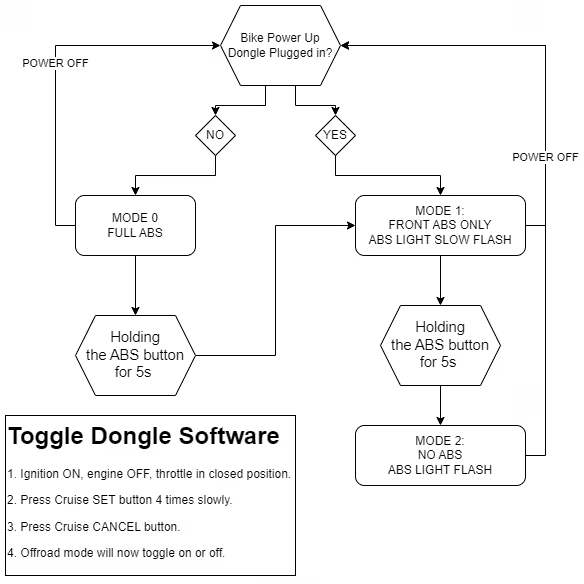
the default mode when powered on is Mode 1, ABS only on the front wheel. Indicated by a slow flashing ABS light. Holding the ABS button for 3-5 seconds will change to mode 2, No ABS. Indicated by a steady flashing light. After power reset, bike will revert to mode 1.
Adventure 1190/1090
Functions on Adventure models (1190/1290): (See notes below for 1050/1090 models)
- ABS mode “Offroad”:
The ABS function is only active on the front wheel (single-channel ABS). The rear wheel can lock at any time without ABS controlling the braking procedure. - ABS mode “Off”:
The ABS function is switched off; it remains deactivated even after switching the ignition back on. The front wheel and rear wheel can lock at any time without the ABS controlling the braking procedure. - Function “80 octane” (up to model year 2016):
Reduced engine power for trips with lower fuel quality
The ‘OFFROAD PACK’ 60600980000 is additionally required for the 1050/1090 ADVENTURE to be able to use the dongle.
Functions on the Super Duke models (1290/1290GT) – will NOT work on 2020+ Super Duke R
ABS mode “Supermoto”: The ABS function is only active on the front wheel (single-channel ABS). The rear wheel can lock at any time without ABS controlling the braking procedure. ABS mode “Off”: The ABS function is switched off; it remains deactivated even after switching the ignition back on. The front and rear wheels can lock at any time without ABS controlling the braking procedure. Will save ride mode and MTC settings
Software Toggle
To Toggle the software addon ON and OFF:
- Ignition ON, engine OFF, throttle in closed position.
- Press the SET button 4 times slowly.
- Press the CANCEL button. Any other button or timeout of 60 seconds will cancel this procedure.
- Offroad mode will now toggle on or off.