USB Configuration Programming
Commands
For Advanced Users and diagnostics. A variety of conditions can be changed with the USB-C terminal. Remove the USB-C cover and connect the controller to a PC or Android phone with a Serial Terminal app.
| Function | Arguments | Comments |
| DFU | None | Enter bootloader mode for firmware upgrades |
| Config | None | Print out the current config |
| Stopcode | None | Prints the last stop code from Cruise Cancel event. See Kill Conditions. Memory lost on power. |
| Debug | None | Start/Stop printing Debug messages. While cruise is active: 3 data fields are: cruiseSetPoint, CAN_Rear_Wheel, output_throttle. Use for custom tuning PID. |
| Reset | None | Reset config to default values. |
| Help | None | Print Help, Shows Firmware version |
| Wheelx | 1 | Adjust the wheel speed sensor factor. Change for custom applications or extreme tire changes. |
| SpeedINC | 30 | Adjust the amount to increase speed with a single press of the INC/DESC buttons. Units are KPHx10, default value is 30 = 3.0 KPH |
| PID | 22 3 0 | Adjust the PID gain |
| tmax | 60 | Adjust the Maximum throttle limit. Units are 1% |
Examples:
speedinc 10
The above command will set the new speed increment to 1.0 kph.
PID Tuning
Command to read values: CONFIG
Command to set new values: PID 200 15 00
The above command will set the PID controller with values of P=200, I=15, D=00
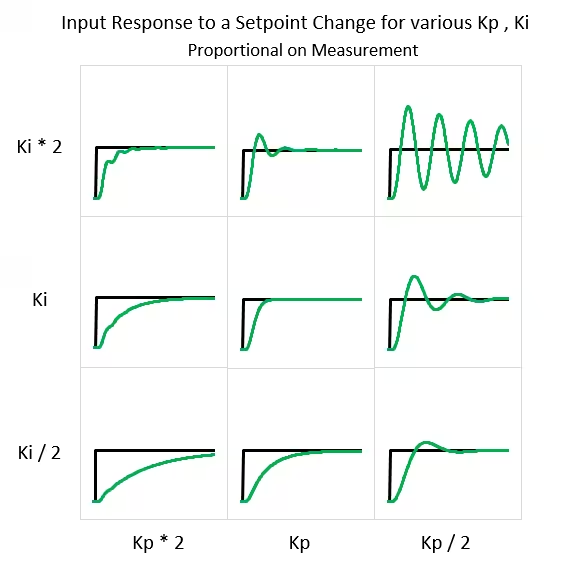
For P value, Keep P value as high as possible until oscillation start, then back 20%.
For I value, Adjust to preference until bike maintains speed over hills and bumps. Too little and the cruise will be sluggish, Too much integral gain can cause a lot of overshoot and surge feeling.
For D value, generally best to keep this at 0. In some cases this can help dampen your response as you’re approaching the set point.
Our system uses PID with Proportional on Measurement, the following curves can be used to tune feedback. Dig Deeper with this article.