USB Configuration Programming
Commands
For Advanced Users and diagnostics. A variety of conditions can be changed with the USB-C terminal. Remove the USB-C cover and connect the controller to a PC or Android phone with a Serial Terminal app.
| Function | Arguments | Comments |
| DFU | None | Enter bootloader mode for firmware upgrades |
| Config | None | Print out the current config |
| Stopcode | None | Prints the last stop code from Cruise Cancel event. See Kill Conditions. Memory lost on power. |
| Debug | None | Start/Stop printing Debug messages. While cruise is active: 3 data fields are: cruiseSetPoint, CAN_Rear_Wheel, output_throttle. Use for custom tuning PID. |
| Reset | None | Reset config to default values. |
| Help | None | Print Help, Shows Firmware version |
| Wheelx | 1 | Adjust the wheel speed sensor factor. Change for custom applications or extreme tire changes. |
| SpeedINC | 30 | Adjust the amount to increase speed with a single press of the INC/DESC buttons. Units are KPHx10, default value is 30 = 3.0 KPH |
| PID | 22 3 0 | Adjust the PID gain |
| tmax | 60 | Adjust the Maximum throttle limit. Units are 1% |
Examples:
speedinc 10
The above command will set the new speed increment to 1.0 kph.
PID Tuning
Command to read values: CONFIG
Command to set new values: PID 200 15 00
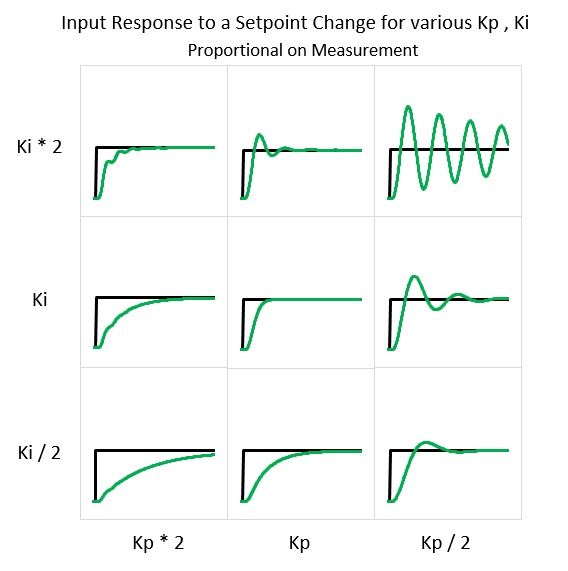
The above command will set the PID controller with values of P=200, I=15, D=00 For tuning, Keep P value as high as possible until oscillation start, then back 15%. For I value, Adjust to preference until bike maintains speed over hills and bumps. For D value, keep at 0 unless directed by staff.
Our system uses PID with Proportional on Measurement, the following curves can be used to tune feedback.