
Search
Firmware Updates

Firmware updates are available as we tweak settings and add new features.
Check our google drive here for the latest version. Currently firmware updates are only supported on windows machines.
- Remove control module from bike harness for best results.
- Connect USB-C cable to a desktop computer.
- Extract the Zip file and run the VCUpdater.bat file
- Select the desired firmware to update with a number key
- Select the device Com Port by entering only the number portion. For COM8, simply enter 8, then enter.
- Script will now put the device in Device Firmware Update mode, DFU, and attempt to flash. DO NOT DISCONNECT.
- Successful flashing example below
For slow programming or failures. Do not unplug device. Attempt to flash again.
If unsuccessful, please get in touch with your error message

LIB_USB_ERROR_NOT_SUPPORTED
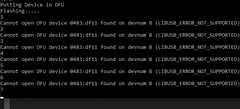
If you get this error, the drivers for DFU mode are not setup correctly. Leave the device connected and powered on. DFU device needs to have WinUSB Drivers.
- Download Zadig driver tool (Also included in our Firmware Zip files)
- Run the Batch firmware update script to get the LIB_USB_ERROR. Do not unplug the device.
- From the Options Menu of Zadig, Select “List all device”
- Find the STM32 Bootloader in the dropdown and change the driver to WinUSB
- Click Upgrade or Replace driver.
- Run the firmware update tool again. Any Port number can be entered.
